Do you need coding to use AI? In most everyday delivery situations, not really. With an approved AI assistant, you can often turn notes into a draft, organize information, compare options, or spot possible gaps without writing code.
Key takeaways
- You Don’t Need Coding Skills to Start Using AI: Project Managers, Product Owners, and Scrum Masters can use AI for everyday tasks such as drafting reports, organizing information, refining user stories, and preparing retrospectives without writing code.
- AI Literacy Matters More Than Programming: Effective AI use requires clear instructions, professional judgment, critical thinking, output verification, and responsible handling of confidential information.
- Human Accountability Remains Essential: AI can assist with tasks and suggest solutions, but professionals must validate outputs, make decisions, and take responsibility. Coding and technical expertise become important when building integrations, automations, or custom AI systems.
- Start Small With Low-Risk AI Tasks: Begin with manageable activities such as drafting status reports, reviewing risk logs, or organizing meeting notes. Keep AI outputs as drafts and verify them before use.
- Know When No-Code Reaches Its Limits: Building custom AI applications, connecting APIs, managing data pipelines, and implementing complex automations require technical expertise, even when the professional using them does not need to become a developer.
“What you cannot delegate is judgment. Choosing the right task, providing suitable context, checking the output, and owning the final decision.”
Much of the confusion comes from the phrase working with AI. It can mean asking a chat assistant to tidy a meeting summary, or connecting an AI model to internal systems and allowing it to trigger business actions. These are not the same activities.
A Project Manager asking an assistant to organize approved notes into a status update is using a tool. A developer building an AI-enabled application, managing API access, or creating a data pipeline is engineering a system. Someone configuring automation between workplace tools sits between the two.
This article explains where coding is unnecessary, where it becomes useful, and how delivery professionals can adopt AI without compromising accountability, confidentiality, or quality.
What People Usually Mean by “Using AI”
“Using AI” is an umbrella term, and that is precisely why it creates unnecessary anxiety.
Some professionals hear AI and imagine machine-learning engineering, Python, cloud infrastructure, and complex integrations. Others picture a chat window where they type a request and receive a draft in return. Both interpretations are valid, but they describe profoundly different work. For the purposes of practical delivery work, it helps to distinguish four modes:
| Mode | What the professional does | Is coding usually required? | What still needs control |
| Conversational AI assistance | Requests a draft, summary, comparison, categorization, or list of questions | Usually no | Approved inputs, factual review, final approval |
| No-code automation | Configures a rule, trigger, or connector through a visual interface | Often no, though setup is required | Permissions, exceptions, testing, monitoring |
| Low-code integration | Shapes data flows, mappings, or system connections with limited technical configuration | Sometimes | Access rights, error handling, change control |
| AI or software engineering | Builds, modifies, integrates, evaluates, or operates an AI-enabled system | Commonly yes | Security, privacy, reliability, testing, maintenance |
The important point is that “no-code” does not mean “no skill.” It means the person completing the immediate task does not need to write programming instructions. The platform behind that interaction is still technical, and the organization still needs controls around data, access, and consequences.
A tool may offer a simple chat experience in one account but restrict file uploads, integrations, or automation behind administrator settings or a paid plan. Capabilities differ by provider, workplace configuration, region, and subscription. Before relying on a feature, confirm what your organization has approved and what the vendor currently supports.
The Real Question: Can I Use AI in My Current Role?
Most readers are not asking whether they should become AI engineers. They are asking something more immediate:
“Can I use AI in my existing delivery role without first becoming a developer?”
For many bounded tasks, the answer is yes.
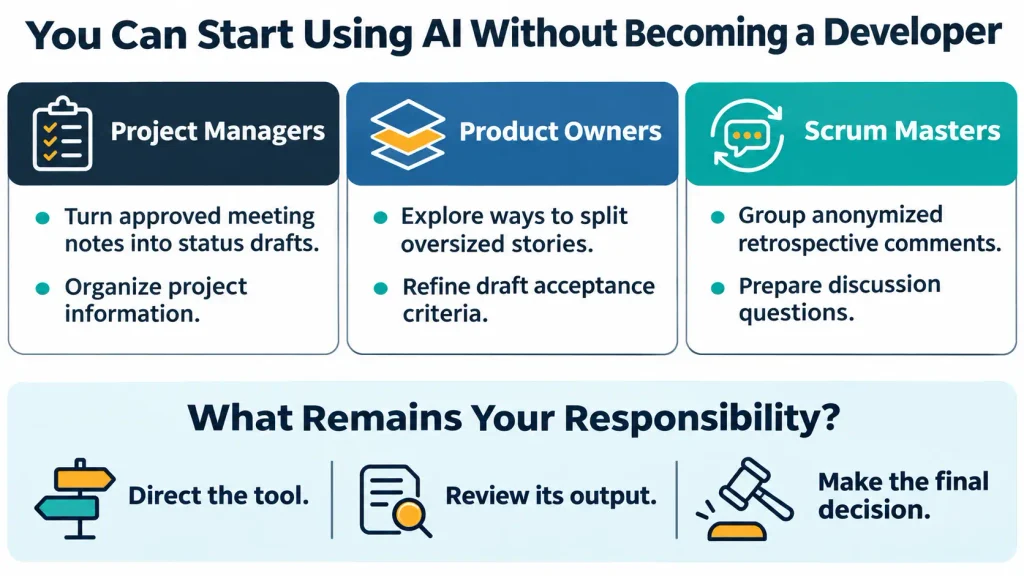
A Project Manager can ask an approved assistant to transform meeting notes into a first-draft status report. A Product Owner can ask it to propose alternative ways to divide an oversized story. A Scrum Master can ask it to group anonymized retrospective comments into possible discussion themes.
In each case, the professional is not programming. They are directing a tool, reviewing its output, and deciding what may enter a formal work product.
That does not mean every AI-related job is non-technical. It also does not mean every organization exposes an approved AI tool, permits every type of input, or allows a user to automate a workflow without oversight.
The useful position is neither “AI requires coding” nor “no-code removes the need for expertise.” The first exaggerates the barrier to entry. The second understates the judgment required to use AI responsibly.
AI Literacy Is More Than Prompt Writing
AI literacy is often reduced to knowing how to write a prompt. That view is too narrow.
In a delivery environment, AI literacy means knowing when AI is appropriate, how to frame a request, how to interpret an imperfect answer, how to protect sensitive material, and how to remain answerable for the final result.
A capable AI user does not merely know what to type. They know what to check before acting on the response.
The following capabilities matter more than syntax:
- Choosing a suitable task: Choose specific, repeatable and reviewable tasks. “Draft up 3 possible versions of this update” is possible. “Run the project” is not.
- The Intent of the Context: Describe the document, audience, purpose, and constraints without providing any more information than the task asks for.
- Provide precise directions: Define the desired output, desired tone, boundaries, and how to handle missing information.
- Acknowledge uncertainty: Ask the assistant to distinguish between evidence and inference, and to make assumptions explicit rather than implicit.
- Use domain judgment: your understanding of delivery, stakeholders, dependencies, quality, compliance, business consequences.
- Checking the output: Verify material facts against the original record prior to use of the work.
- Protecting information: Follow employer policy, provider terms, control of access, retention rules, and confidentiality requirements.
- Own the outcome: Think of the model as a contributor, not the decision maker.
These abilities do not require a computer-science background. They require professional maturity.
A person may be excellent at prompting yet still produce a poor work product if they fail to validate dates, commitments, assumptions, or source material. Conversely, an experienced Project Manager may produce a highly useful draft with a simple request because they know exactly what needs checking.
Clear instructions can improve the usefulness of an AI response, but they do not turn an unverified draft into a verified fact.
Where No-Code Ends and Engineering Begins
The boundary between using AI and building AI is not always obvious. A useful test is to ask what happens if the system makes a mistake.
If the output is a draft that a person reviews before use, the consequence is usually contained. If the system sends a message, updates a record, moves data between platforms, or influences a customer-facing process, the consequence becomes operational.
That shift changes the required controls.
A conversational assistant may help a Project Manager prepare a status update. But an automation that reads project data, assigns owners, updates a tracker, or notifies stakeholders needs a different level of scrutiny.
Before enabling such a workflow, someone needs to answer:
- What event starts the automation?
- What information moves between systems?
- Who has permission to access or change that information?
- What happens when the source data is incomplete or wrong?
- How are duplicates, failures, and exceptions handled?
- Who can pause, revise, or shut down the workflow?
- Who is accountable when something goes wrong?
Visual automation platforms can make these workflows accessible without conventional programming. Microsoft Power Automate, for example, describes creating a cloud flow from a natural-language description, reviewing connected applications, testing it, and reviewing run history. Zapier similarly describes no-code, low-code, and full-code options, including AI-enabled steps that can operate across connected applications. These capabilities are product-specific, not universal workplace defaults.
A visual interface can hide code. It cannot hide responsibility.
How to Give an AI Assistant a Useful Brief
A vague request produces a vague result. “Improve this project update” gives the assistant little to work with and gives the user little confidence in the output.
A better approach is to treat the request as a miniature work brief. You must Include:
- The working context: Explain what the material is and why the output is needed.
- The permitted source: Identify the notes, document, or data the assistant may use.
- One bounded task: Ask for a summary, comparison, categorization, draft, or gap review and not an open-ended solution.
- The audience and constraints: Specify who will read it, the required tone, and what must not be assumed.
- The desired format: Request a table, checklist, short draft, or another structure that fits the work.
- A rule for uncertainty: Instruct the assistant to identify missing evidence, conflicting information, and assumptions.
- Your review standard: State which facts you will verify before accepting the output.
For instance, instead of asking, “Write my weekly update,” a Project Manager might say:
“Using only the approved notes below, create a concise draft for the steering group. Put confirmed progress, risks, decisions needed, and unresolved questions in separate sections.
Do not add dates, owners, completion percentages, or commitments that are not in the notes. Mark anything that needs verification. I will check the draft against the source before sending it.”
That request is more useful because it defines the task, limits invention, and makes review part of the workflow.
It still does not guarantee accuracy. A fluent response can omit an important exception, misread a dependency, or present a plausible assumption as fact. The human reviewer remains essential.
Reusable prompts can save time when a task recurs. But they should be treated as working templates, not permanent instructions. Review them when the tool, data, context, or approval requirements change. Store them only in approved locations, especially if they contain role-specific information.
What Project and Delivery Managers Can Try First
Project and Delivery Managers often work with information that is already structured: meeting notes, risk registers, plans, decisions, dependencies, and stakeholder updates. That makes several AI-assisted tasks practical without coding. Possible applications include:
- Converting approved meeting notes into a first-draft status report
- Identifying missing fields or inconsistencies in a risk log
- Grouping risks into themes for discussion
- Preparing questions for a stakeholder conversation
- Comparing two versions of a plan or schedule
- Drafting a decision-record entry from confirmed facts
The value lies in preparation, not substitution.
AI may help a Project Manager see that a risk entry lacks an owner, response, due date, or evidence. It cannot determine whether the organization is genuinely exposed to that risk. That assessment belongs to the accountable risk owner.
Likewise, AI may organize a status report, but it should not decide whether a milestone is achievable, whether a dependency is acceptable, or whether an escalation is required.
The Certified AI Project Manager credential from the American School of AI is built around this type of work. Its published material describes using AI on a learner’s own status report and risk log, with work marked independently after the class.
What Product Managers and Product Owners Can Try First
Product professionals work with ambiguity: customer signals, competing priorities, incomplete evidence, and evolving scope. AI can help organize that ambiguity, but it cannot resolve it. Useful applications include:
- Summarizing approved customer feedback
- Identifying repeated themes while retaining representative examples
- Drafting a problem statement
- Proposing possible ways to split a large story
- Improving the clarity of acceptance criteria
- Highlighting assumptions, dependencies, and unanswered questions
“The Product Owner must decide what matters.”
A generated story is not customer research. A proposed backlog slice is not a validated priority. A polished acceptance criterion is not automatically testable, feasible, accessible, or aligned with compliance requirements.
AI can help a Product Owner prepare options. The Product Owner decides what enters the backlog, what value it creates, what risks it introduces, and what should ship.
It is important to remember that a Certified AI Product Manager / Product Owner credential focuses on backlog work, including story splitting and acceptance-criteria refinement.
What Scrum Masters and Team Facilitators Can Try First
Team facilitation involves trust. That makes confidentiality and careful framing especially important. AI can assist with:
- Preparing a retrospective agenda
- Grouping anonymized comments into possible themes
- Suggesting neutral follow-up questions
- Creating prompts for stand-ups or planning sessions
- Rewriting an impediment description for clarity
- Identifying recurring patterns across approved notes
But it should never be used to identify who write a comment, infer motives, rank team members, or diagnose performance.
A model may notice that several comments mention handoffs or unclear priorities. The Scrum Master must still check whether that pattern is real, whether it is representative, and whether it is safe to discuss openly.
“The purpose is not to replace facilitation. It is to give the facilitator a better starting point for a conversation the team can own.”
The Certified AI Team Facilitator credential centers on ceremonies, impediments, and retrospective work, with independently assessed submissions based on the participant’s own material.
Four Practical Examples of No-Code AI Use
The following examples are instructional scenarios. They are not customer case studies, measured outcomes, or claims about time savings.
Preparing a Weekly Status Report
A Project Manager has approved meeting notes, a milestone list, and a risk log. The assistant is permitted, and sensitive details have been handled according to policy.
The manager asks for a short draft with separate sections for progress, risks, decisions needed, and unknowns. The instruction explicitly forbids invented dates, owners, completion percentages, or commitments.
The manager then checks every material statement against the source material. Unsupported claims are removed. Current owners and dates are confirmed.
The assistant produces a draft. The Project Manager produces the report.
Reviewing a Risk Log Before a Meeting
A Delivery Manager wants to prepare for a risk review. The log can be shared in approved form, with identifying or commercially sensitive information minimized.
The manager asks the assistant to identify risks where cause, impact, owner, response, due date, or evidence may be missing. The instruction also asks it to separate an absent field from a factual conclusion.
The manager reviews each flag. Some may be genuine gaps. Others may reflect a different label, an incomplete extract, or a misunderstanding of the log’s structure.
The assistant provides a review aid. The accountable owner assesses the risk.
Dividing an Oversized Product Story
A Product Owner has a story that is too large for the next iteration. The story and relevant context are approved for use.
The Product Owner asks for several candidate slices, draft acceptance criteria, assumptions, dependencies, and questions. The instruction requires the assistant to retain the original user need and clearly label guesses.
The Product Owner evaluates whether each slice is valuable, testable, feasible, accessible, and compliant. Engineering, design, security, and customer evidence may be needed before anything enters the backlog.
The assistant suggests options. The Product Owner decides scope and priority.
Preparing a Retrospective From Team Comments
A Scrum Master wants to identify possible themes across the last three retrospectives. The comments are anonymized or otherwise approved for use.
The Scrum Master asks the assistant to group related comments, preserve disagreement, avoid quoting unsafe material, and propose neutral questions for the next session.
The Scrum Master checks whether the themes reflect the comments and whether a small number of remarks have been overstated as a team-wide pattern.
The assistant helps organize the material. The Scrum Master facilitates the discussion and protects the team’s trust.
Assistance Is Not Automation, and Automation Is Not Autonomy
These three terms are often used interchangeably. They should not be.
“Assistance means a person asks for help, examines the result, and decides what happens next.”
“Automation means a configured system performs a step after a trigger, such as moving a form submission into a review queue.”
“Action-taking means a system may use connected tools to create, update, or communicate something. This is the most consequential category.”
| Level | What occurs | Example | Required human control |
| Assistance | AI produces a draft, analysis, or categorization | Draft a status update from approved notes | Human reviews and approves |
| Automation | A rule triggers a task or moves data | Route a submitted issue to a review queue | Owner tests permissions and exceptions |
Beginners should generally remain at the assistance level. It offers a contained way to learn how AI behaves before introducing system-level consequences.
Automation introduces failure modes that a draft does not: incorrect triggers, outdated source data, excessive permissions, duplicate actions, unexpected outputs, and difficult-to-reverse changes.
“A no-code interface does not eliminate these risks. It may make them easier to create.”
Never connect a personal AI account to workplace systems without explicit authorization. A draft message is not the same as a sent message, and a proposed update is not the same as a completed transaction.
How to Check an AI Draft Before Using It
“The most important skill in AI-assisted delivery work may be disciplined review.”
A response can be articulate, well organized, and entirely wrong in a material respect. It may invent a date, overlook an exception, blur a disagreement, or turn a possibility into a recommendation.
Review should focus on what matters:
- Check names, dates, amounts, owners, statuses, and commitments against the source record.
- Ensure summaries preserve exceptions, dissent, and uncertainty rather than making the situation appear tidier than it is.
- Identify assumptions that were not supplied in the original material.
- Open cited sources and confirm that they support the specific claim.
- Use trusted systems or calculations for schedules, budgets, and quantitative decisions.
- Seek specialist review for security, legal, regulatory, contractual, or high-impact work.
- Record material revisions and final approval where the workflow requires it.
The level of scrutiny should match the stakes.
A low-risk agenda draft may need a brief check. A customer commitment, contractual statement, security assessment, personnel matter, or regulated decision requires stronger controls—and may be inappropriate for a general-purpose AI tool altogether.
A citation is not proof. It is an invitation to inspect the source.
The person who sends, approves, prioritizes, or acts on the output must understand it well enough to defend it. Genuine human oversight means having the authority and willingness to reject, revise, or escalate an output.
Protecting Confidential Information From the First keystroke
“Data protection begins before a prompt is written.”
Use only tools approved by your employer. Follow the provider’s current terms, account settings, retention rules, access controls, and contractual arrangements. Share the minimum information required for the task.
Removing a name does not automatically anonymize a document. Context, project details, dates, financial figures, or unusual events may still identify a person, team, customer, or organization.
When real material cannot be shared, use an approved practice dataset instead.
Avoid placing the following into a personal AI tool unless authorization is explicit:
- Customer records
- Personnel notes
- Source code
- Financial data
- Security information
- Confidential commercial plans
- Unpublished product roadmaps
- Contractual or legal material
Provider policies differ. OpenAI, for example, distinguishes between personal workspaces and certain business, enterprise, education, healthcare, and API contexts in its published documentation. Organizational retention and access policies may still apply. That position is specific to OpenAI and should not be assumed to apply to every provider.
Turning off model training does not automatically create confidentiality, approval, deletion, or a complete privacy review.
When Technical Support Becomes the Right Answer
Coding is not a universal requirement, but it becomes relevant when the work moves beyond what an existing interface can safely support. Common triggers include:
- Building a custom internal assistant or application
- Calling an AI model through an API
- Connecting systems for which no approved connector exists
- Processing large or complex datasets repeatedly
- Creating data pipelines, access controls, logs, or monitoring
- Developing, fine-tuning, or evaluating a model
- Implementing retrieval over controlled company data
- Embedding AI output into a high-impact operational process
These activities do not mean every Project Manager or Product Owner must become an engineer. They mean the organization needs technical capability somewhere in the system.
A Product Owner can define the user problem, desired behavior, data boundaries, and acceptance criteria without coding. A Delivery Manager can coordinate security review, dependencies, testing, and rollout. Engineers and IT specialists may still need to assess feasibility, reliability, integration design, privacy, cost, and maintenance.
Working with the OpenAI API, for instance, involves creating and securing an API key and using a software development kit or HTTP request. That is a developer-oriented route, distinct from asking an assistant a question through a regular chat interface.
“You do not need to code for this task” is not the same as “the system needs no technical expertise.”
A Sensible First Experiment
Do not begin by asking AI to transform your entire delivery process. Begin with one task that is easy to inspect and unlikely to cause harm if the output is imperfect. A practical first experiment looks like this:
- Select one bounded, reviewable task.
- Confirm that both the tool and the input are approved.
- Remove unnecessary sensitive information.
- Write a clear brief with source, task, constraints, format, and uncertainty rules.
- Request a draft or analysis—not an action.
- Check material claims against the original source.
- Revise the output using professional judgment.
- Assess whether the result was genuinely useful.
- Save a reusable pattern only in an approved location.
- Involve technical and security owners if integration or automation is needed.
“The goal is not to use AI everywhere. It is to discover where it adds value without weakening control.”
If reviewing the output takes longer than doing the task manually, or if the output cannot be trusted with the available data, pause and redesign the approach.
Mistakes That Undermine AI-Assisted Work
- Giving an open-ended instruction. “Sort out this project” provides no deliverable, audience, or quality standard.
- Supplying too little context. Generic input leads to generic advice.
- Mistaking fluency for accuracy. A confident response can still contain unsupported claims.
- Delegating a role decision. AI can identify options; the accountable professional decides.
- Treating a generated commitment as agreed. Dates, estimates, and owners must be confirmed with the responsible person.
- Using team comments to judge individuals. Retrospective material requires fairness, context, and psychological safety.
- Sharing sensitive data because the tool is convenient. Convenience is not permission.
- Accepting a citation without reading it. Verify that the source supports the precise claim.
- Automating an untested process. A flawed workflow can repeat a mistake at speed.
- Assuming all AI work is code-free. User-level assistance may be code-free; integration and engineering often are not.
Building Capability Without Becoming a Developer
For professionals who want structured practice, we offer role-based starting credentials for those already working in product ownership, project or delivery management, or Scrum Master and team coaching.
We currently offer three one-day starting credentials:
- Certified AI Product Manager / Product Owner (AI-PMPO) for Product Managers, Product Owners, and backlog owners
- Certified AI Project Manager (AI-PM) for project and delivery managers
- Certified AI Team Facilitator (AI-TF) for Scrum Masters and team coaches
“At American School of AI, our credentials do not require you to write code, and free versions of major AI tools are sufficient for the class. ”
Each credential involves a published standard, live instruction, and independent assessment of work based on the learner’s own material. Work is submitted within 14 days of class, marked by someone who did not teach it, and may receive a “Not yet” result. One free resubmission is available.
You can progress from these starting credentials to our Certified AI Integration Manager, a two-day credential, and our Certified AI Adoption Leader, a three-day credential.
For guided practice, explore our live, role-based classes for Project Managers, Product Managers / Product Owners, and Scrum Masters or Team Facilitators. Choose the learning path that best matches your current responsibilities. Choose the learning path that matches your current responsibilities.
Frequently asked questions
Do I need Python to use AI in a delivery role
Usually, no. You can often use an existing assistant through its normal interface to draft, summarize, organize, compare, or critique work without coding. Python becomes relevant for custom applications, API integrations, data pipelines, model development, or advanced automation.
Does no-code mean no expertise?
No. It means the immediate interaction may not require conventional programming. It does not remove the need for domain knowledge, careful instructions, verification, data protection, and accountability.
Can AI safely update company systems?
Not automatically. Connected actions require permissions, testing, monitoring, audit trails, approval thresholds, and an accountable owner. Capabilities vary by product and workplace configuration.